
EN
Download

Household chores, as a family

Step-by-step routines, read aloud for the little ones, stars for what gets done, and real rewards that you set yourselves.

Free for real, Premium optional · no ads · no cookies · phone, tablet and computer · now on Google Play

The little house, FamiTask's mascot, waving hello
How it works

Three steps, every day

The board with the day's tasks

The grown-ups set the tasks

Morning and bedtime routines, tidying the room, setting the table… They appear on their own every day, each at its own time, and can be assigned to whoever's turn it is.
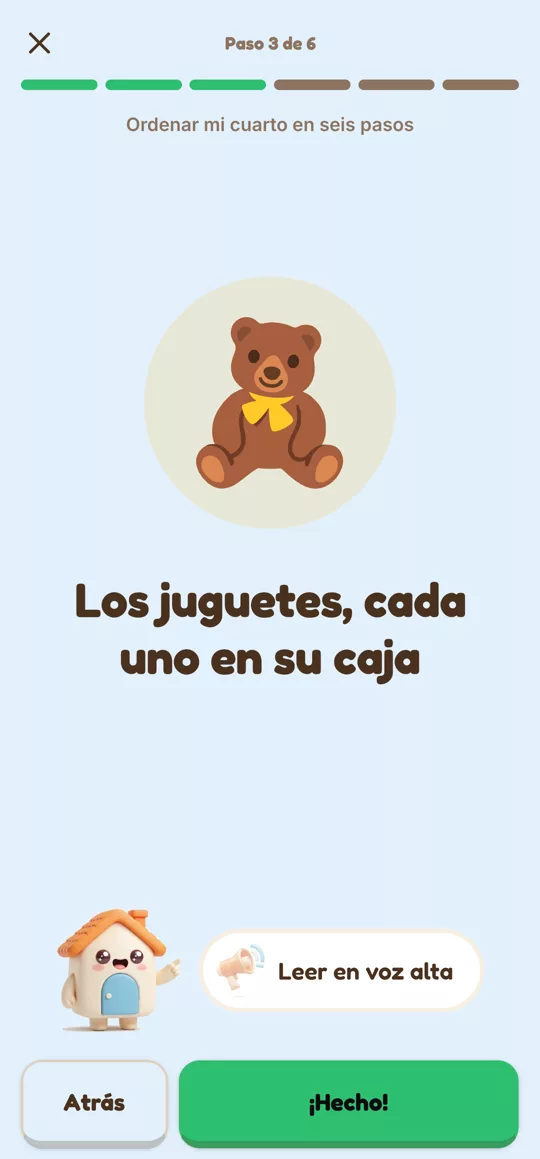
One step of the room-tidying routine

The kids do them

One button to start, and the app tells them what's next, step by step and read aloud. When they finish, the little house celebrates.
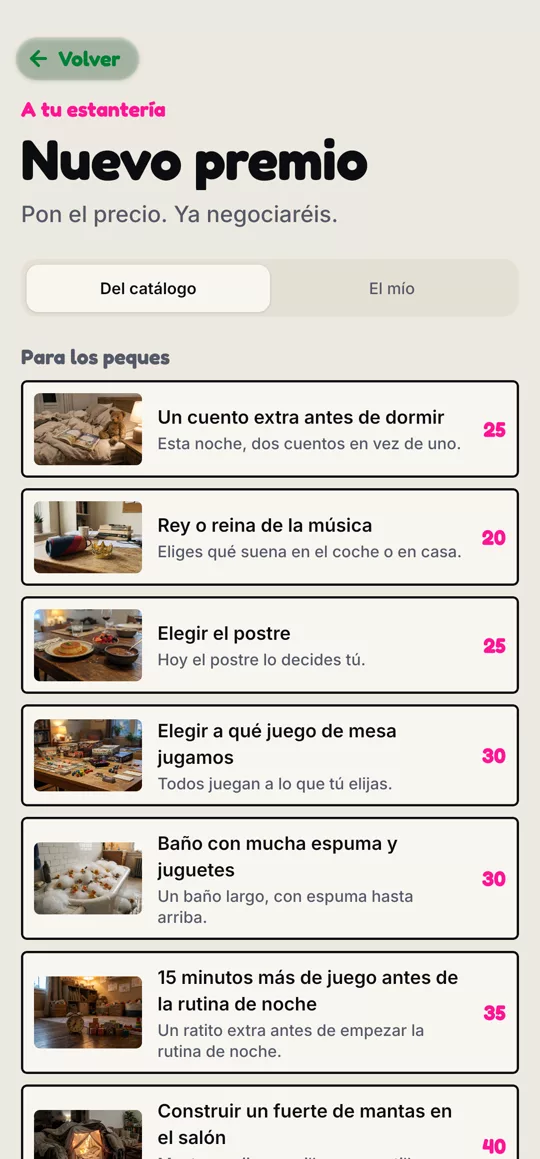
The rewards catalogue, with rewards for kids and for the family

Stars and rewards

Every task earns stars for the kids (and coins for the grown-ups). They're traded for the rewards you offer at home: an extra story, choosing dinner, or an afternoon at the park. Each reward shows a bar that fills up, so everyone can see how much is left.

See the full guide, with screenshots →

Something for everyone

Built for kids and grown-ups alike

For the little ones

The kids

  • They only see their own tasks, with big pictures and a round button to get started.
  • Can't read yet? The app talks to them: every task and reward can be heard with a tap.
  • They earn stars, not money, and a daily path shows how much is left.
  • A piggy bank fills up with consecutive days of chores done; finish the week and get a bonus.
  • Their history is just theirs, and simple: what they've done and what they've earned.
  • They play on an adult's phone or on their own tablet. Getting back to the adult profile needs a fingerprint or password.

The grown-ups

  • Over 300 tasks ready to go, or your own, under their own name.
  • You approve what the kids have done before they get paid.
  • Rewards designed for kids and for the whole family, or anything else you come up with.
  • Family challenge: a few tasks to do together, with one reward for everyone.
  • You're notified whenever someone joins with the family code, and whoever created the group can remove anyone who shouldn't be there.
  • Up to eight people per family, in nine languages: Spanish, Catalan, Galician, Basque, English, Portuguese, French, Italian and German.
  • The free plan really works, with reasonable limits (2 people per family, 1 task at a time, a board of 4). With a small yearly fee, FamiTask Premium removes them all: more people, more tasks at once, assigning tasks, history and the family challenge. And the first 30 days are free, so you can try it with no restrictions.

A few minutes of screen, lots of doing

FamiTask isn't a game to kill time with: you use it for a few minutes to see what's next, then put the tablet down. No ads, no tricks to keep you hooked, and no trackers.

How we look after screen time, and what about blue light →

How to install it

FamiTask is on Google Play, like any other app.

  1. Tap Get it on Google Play or search for FamiTask in the Play Store.
  2. Tap Install.
  3. Open FamiTask, create your account and your family, and add the kids from Profile › My group.
  4. A tablet for the kids? In Profile › My group, next to the child's name, tap Tablet: you'll get a code to type in on it.
▶ Get it on Google Play

Installed it from this website before? Uninstall that version and install the one from Google Play. Your family, your tasks and your stars are saved in your account: sign in again and everything is still there. On the kids' tablet you'll just need to enter its code again.

Got an iPhone or iPad?

Apple doesn't let you install apps outside its store, so on iPhone FamiTask runs from the browser, with its icon on the home screen like any other app. It's the same account and the same family as on Android.

  1. Open lienzovirtual.com/famitask/app in Safari.
  2. Tap the Share button (the square with the arrow pointing up).
  3. Choose Add to Home Screen and tap Add.
  4. Open FamiTask from the new icon and sign in with your account.

There's no fingerprint unlock in the web version: going from a kid's profile back to the adult's asks for the password instead. Notifications also don't arrive while the app is closed.

📱 Open FamiTask in the browser
🚀
Launch

FamiTask is now on Google Play

After its testing phase with real families, FamiTask is now available to everyone. We keep improving it most days, and updates arrive on their own when you open the app.

If something breaks or doesn't make sense, let us know at famitask@lienzovirtual.com. Every report helps us fix it sooner.

Your opinion counts

What would you improve about FamiTask?

FamiTask is a small project growing with the families who use it. If something doesn't make sense, breaks, or you're missing a task, a reward or an idea, write to us. We read every message.

✉ famitask@lienzovirtual.com
QR code to follow FamiTask on Instagram
Follow us

FamiTask on Instagram

News, screenshots and the odd sneak peek before it reaches the app. Scan the code or go straight there.

📷 @fami_task